组件
组件是组成KFP的组成部分,它定义输入,在body中具有用户自定义的逻辑,并生成output。当一个组件模板实例化后,被称为任务(task)。组件是构成pipeline的基本单位,可以使用Python SDK编写组件和流水线,将流水线编译为YAML,然后将流水线提交到符合KFP标准的后端进行下一步操作。
KFP主要提供了4种组件:
- 轻量级Python组件
- 容器化python组件
- 容器化组件
- importer组件
轻量级Python组件
轻量级Python组件适合编写纯python实现的逻辑,官方称为 “self-contained Python function”,事实上此组件的应用场景应该是这几个组件里最狭窄的。它适合纯数据处理和转换节点,但其所有功能,都可以通过容器化组件实现。下述是一个 hello world 示例:
from kfp import dsl

@dsl.component
def add(a: int, b: int) -> int:
    return a + b
其中通过dsl.component装饰器装饰的函数,即为一个组件。它通过python的注解来定义输入和输出。需要注意的是,并非所有python类型都可以作为IO的注解,具体需参考官方文档: data-types 。
另外,add函数当中,不可使用外部变量,这也是self-contained的一个体现,比如想要在函数当中使用外部变量:
@dsl.component
def double(a: int) -> int:
    """Succeeds at runtime."""
    import os  # import 需要书写在函数体内

    VALID_CONSTANT = 2
    return VALID_CONSTANT * a
错误的写法:
# non-example!
import os
INVALID_CONSTANT = 2

@dsl.component
def errored_double(a: int) -> int:
    """Fails at runtime."""
    return INVALID_CONSTANT * a
另外,dsl.component装饰器还有诸多参数,可以指定依赖的库、基础镜像的版本,还可以指定pipy的源等,详见SDK文档 https://www.kubeflow.org/docs/components/pipelines/v1/sdk-v2/ 。
容器化Python组件
容器化的Python组件去掉了所谓“self-contained”的隔离性,它使的组件的函数可以依赖于外定义的符号、外部导入、相邻Python模块中的代码等。为了实现这一点,KFP SDK提供了一种方便的方式将Python代码打包成一个容器。
为了演示这一点,我们创建以下目录结构:
src/
├── my_component.py
└── math_utils.py
其中 math_utils.py定义了 add_number 函数
def add_numbers(num1, num2):
    return num1 + num2
在my_component.py中将其引入
from kfp import dsl
from math_utils import add_numbers

@dsl.component(
    base_image='python:3.7',
    target_image='gcr.io/my-project/my-component:v1')
def add(a: int, b: int) -> int:
    return add_numbers(a, b)
上述通过dsl.component指定了基础镜像以及目标镜像,接下来就能通过命令行打包镜像:
# run:
kfp component build src/ --component-filepattern my_component.py --no-push-image

# 已经build过会有"using cache"等提示
Building component using KFP package path: kfp==2.0.1
Found 1 component(s) in file C:\backup\code\kfp\con_py_com\src\my_component.py:
Add: ComponentInfo(name='Add', function_name='add', func=<function add at 0x000002847A885048>, target_image='gcr.io/my-project/my-component:v1', module_path=......
Using target image: gcr.io/my-project/my-component:v1
...
Docker: Step 6/6 : COPY . .
Docker:  ---> fb73bbc37203
Docker: Successfully built fb73bbc37203
Docker: Successfully tagged gcr.io/my-project/my-component:v1
示例中 --no-push-image代表不推送到远程仓库,如果本地配置好了私有化镜像仓库的凭证,也可以将参数改为--push-image来自动推送镜像。现在执行docker images发现镜像已经构建好,再查看src目录,现在生成了一系列文件:
src
├── Dockerfile
├── dockerignore
├── runtime-requirements.txt
├── kfp-config.ini
...
└── component_metadata/
        └── add.yaml
由此,我们可以使用下述代码创建一个pipeline:
from kfp import dsl

@dsl.pipeline
def addition_pipeline(x: int, y: int) -> int:
    task1 = add(a=x, b=y)
    task2 = add(a=task1.output, b=x)
    return task2.output

compiler.Compiler().compile(addition_pipeline, 'pipeline.yaml')
直接python运行,可以看到本地生成了pipeline.yaml。事实上,这个文件几乎没有可读性,唯一有用的信息在开头几行:
# PIPELINE DEFINITION
# Name: addition-pipeline
# Inputs:
#    x: int
#    y: int
# Outputs:
#    Output: int
components:
  comp-add:
    executorLabel: exec-add
    inputDefinitions:
      parameters:
        a:
...
容器化组件
在KFP中,每个任务都是在容器中执行的,也就意味着所有的组件就是定了3个参数:镜像,命令,args。和之前的组件都不相同的是,容器化组件可以直接定义这3个参数:
from kfp import dsl

@dsl.container_component
def say_hello():
    return dsl.ContainerSpec(image='alpine', command=['echo'], args=['Hello'])
其中通过dsl.ContainerSpec接收了这3个参数,而将其定义到pipeline当中,并没有区别:
from kfp import dsl
from kfp import compiler

@dsl.pipeline
def hello_pipeline():
    say_hello()

compiler.Compiler().compile(hello_pipeline, 'pipeline.yaml')
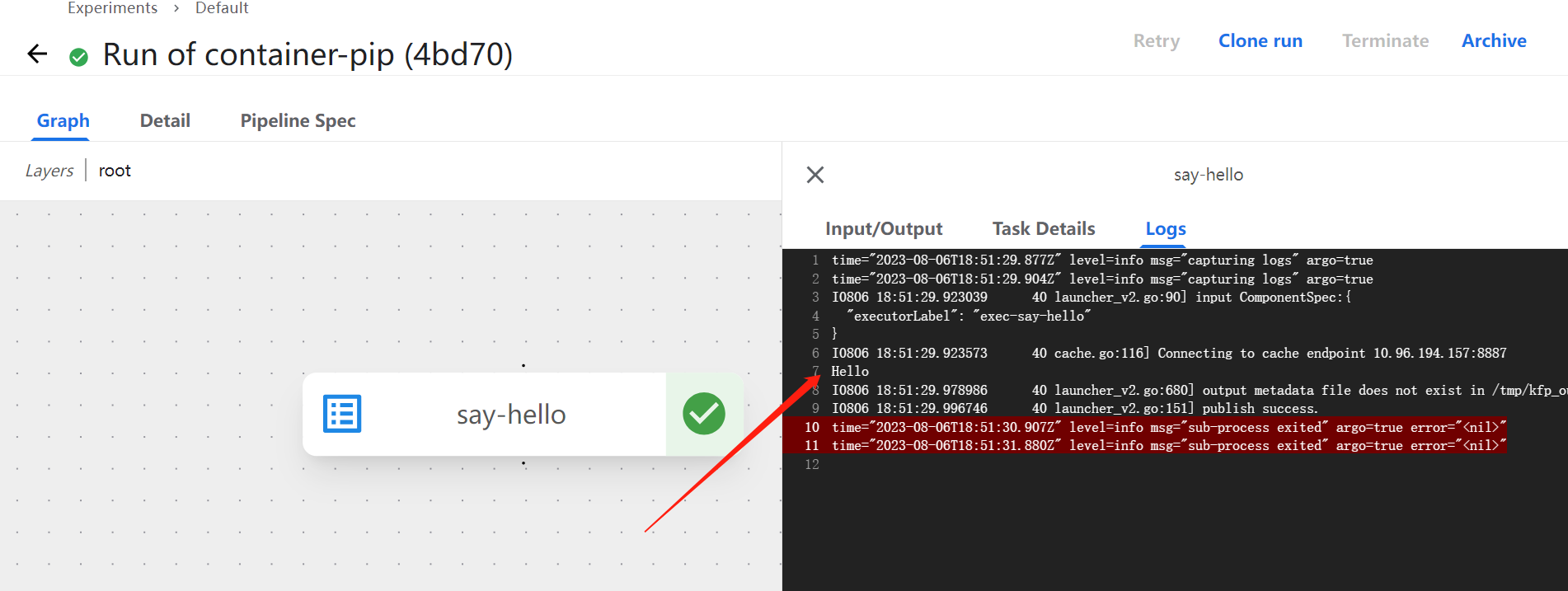
让它在流水线中运行,在log里可以看到"Hello":
输入
上述的实例中并没有指定输入,而实际应用中每个节点必然会至少对应一个input,像下述:
from kfp import dsl

@dsl.container_component
def say_hello(name: str):
    return dsl.ContainerSpec(image='alpine', command=['echo'], args=[f'Hello, {name}!'])

    # 也可以写作:
    # return dsl.ContainerSpec(image='alpine', command=['sh', '-c', 'echo Hello, $0!'], args=[name])
输出
另外它也必然有一个输出,但它不能通过python注解的方式指定,而是要使用类似C++ “出参”的方式定义:
@dsl.container_component
def say_hello(name: str, greeting: dsl.OutputPath(str)):
    ...
为什么会如此奇怪呢?
事实上,在运行时,通过dsl.OutputPath定义的参数,会传入一个系统自动生成的路径,组件应该以JSON格式把结果写到这个路径下,just like this:
@dsl.container_component
def say_hello(name: str, greeting: dsl.OutputPath(str)):
    """Log a greeting and return it as an output."""

    return dsl.ContainerSpec(
        image='alpine',
        command=[
            'sh', '-c', '''RESPONSE="Hello, $0!"\
                            && echo $RESPONSE\
                            && mkdir -p $(dirname $1)\
                            && echo $RESPONSE > $1
                            '''
        ],
        args=[name, greeting])
其中需要注意的是,系统并不能保证这个path一定存在,所以需要应用程序试探性创建父目录。
此外,还需要注意的是,在pipeline中使用此component时,永远不需要给: dsl.OutputPath参数传值,它的参数是运行时动态生成的,就像下述示例:
from kfp import dsl
from kfp import compiler

@dsl.pipeline
def hello_pipeline(person_to_greet: str) -> str:
    # greeting argument is provided automatically at runtime!
    hello_task = say_hello(name=person_to_greet)
    return hello_task.outputs['greeting']

compiler.Compiler().compile(hello_pipeline, 'pipeline.yaml')
这也就意味着,output类型的参数必须定义在参数列表的末尾。而且,KFP Python SDK还提供了类似命令行解析的参数来解析input:
@dsl.container_component
def hello_someone(optional_name: str = None):
    return dsl.ContainerSpec(
        image='python:3.7',
        command=[
            'say_hello',
            dsl.IfPresentPlaceholder(
                input_name='optional_name',
                then=['--name', optional_name],
                else_=['--name', 'friend'])
        ])
此外还有第四类importer component,其作用是将外部产物引入到pipeline当中。后续用到时,再补充。
参考资料: https://www.kubeflow.org/docs/components/pipelines/v2/components